 Cotizy
Cotizy Guides
How to make a quote on your phone and send it by WhatsApp
Quick answer
- A quote says who it’s from, who it’s for, what’s included and at what price, the total, and how long those prices hold.
- Send it as a PDF, not a photo or a loose message: it looks professional, it prints well and your client can open it on any phone.
- With a quote app like Cotizy (free, no ads), it takes a couple of minutes: you pick the client, tap your products, and the app adds it up, applies the discount and makes the PDF.
- If the client doesn’t reply, follow up after two or three days. If they say yes, the next step is the receipt.
Want to do it step by step? Start with what it should include.
We make Cotizy, the free app we use in steps 2 to 5. What a quote should include works just the same in Word, in Excel or on paper.
What you need: The prices of what you’re quoting · Your client’s name and phone number · An Android phone
-
Know what it should include
Your details: your business name, your phone and, if you have one, your tax ID. That way the client knows who to call.
The client’s details: their name or company name and, if they ask for it, their tax ID.
Number and date: a number of your own (Q-0001, Q-0002…) so you can find it fast when the client calls.
The line items: each product or service with its quantity, unit, unit price and amount. Listing materials, labor and delivery separately heads off arguments.
Discount, tax and total, at the bottom where they’re easy to see.
How long it’s valid: prices change. “Valid for 15 days” protects you if the client comes back two months later.
Terms: deposit, delivery time, how they can pay. For example: “50% deposit, delivery in 3 business days.”
NoteA quote isn’t an invoice. It only tells the client your prices so they can decide. If your business has to issue official tax invoices, you issue them separately when you make the sale.
-
Save your details and prices once
What eats up the most time is typing the same things into every quote. Save your business details and your price list once, and every new quote already has them.
With CotizyWhen you open Cotizy, type your business name: your country’s currency and paper size come ready. In Settings → Business details you add your phone, your address and your tax ID. If you charge a tax on top, add it in Settings → Currency and tax. Add your products in Products, one at a time with New product or all at once with Import from Excel.
-
Put the quote together
Pick the client, add what you’re quoting and check the total. If you give a discount, show it: the client sees how much they save.
With CotizyTap New → New quote. Under Client, tap Choose a client or create one. Under Products and services, tap My products and pick what you’re quoting; if something isn’t on your list, tap Write one. Adjust the quantities, the Discount and the Terms. The Valid until date is already filled in, and you can change it.
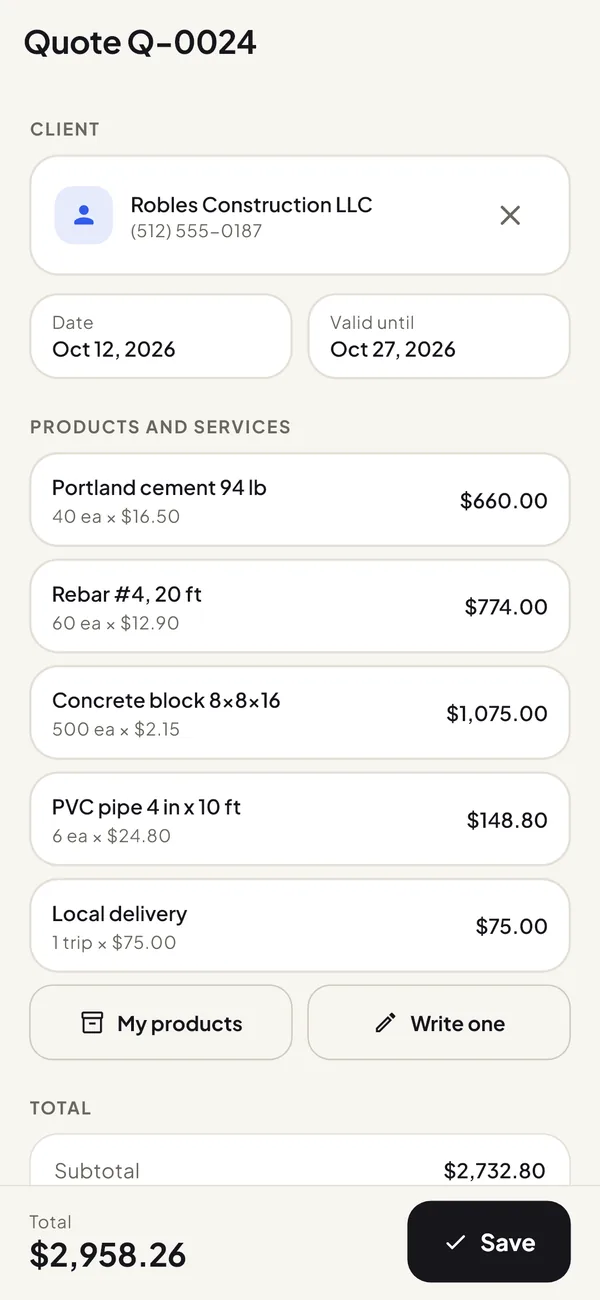
You quote by tapping your products: the app adds it up and applies the discount. -
Send it by WhatsApp as a PDF
A PDF looks the same on any phone or computer, prints well and stays saved in the chat. Add a short message: “Hi James, here’s the quote for the cement. These prices are good until October 27.”
With CotizySave the quote and tap Send. Choose WhatsApp and your client’s chat. You can also send it by email or print it.
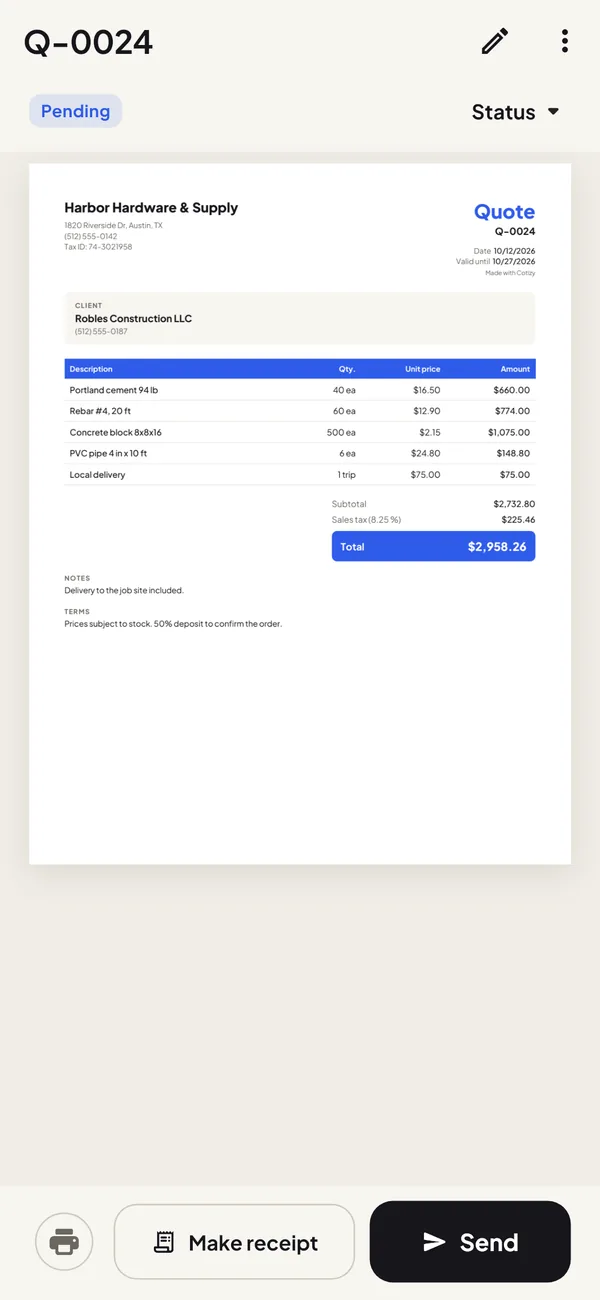
What you see in the preview is what your client gets. 
-
After you send it
A quote with no reply isn’t a lost sale: follow up after two or three days and ask if they have any questions. If they ask for changes, edit the same quote and send it again, so there aren’t two versions with different prices going around.
With CotizyMark the quote as Accepted or Rejected under Status. The main screen shows how many are still pending. If the client says yes, tap Make receipt: the receipt comes out with the same products, and you enter how much they paid.
If they pay part now, see how to make a receipt with a deposit and balance due.
Mistakes that cost you sales
Sending a photo or a screenshot instead of the PDF
A photo looks blurry, gets cropped and doesn’t print well. A PDF looks the same on any screen and works as a real document.
Leaving out how long it’s valid
If the client comes back after your prices went up, you either honor the old price or argue about it. Always include a valid-until date.
Lumping everything into one line
“Full job: $3,500” invites haggling. Listing materials, labor and delivery separately shows where the money goes.
Bringing up the deposit at the end
If you need a deposit to buy materials, put it in the terms of the very first quote.
Quoting without a number
When a client calls about “the quote from last week,” a number like Q-0012 lets you find it in seconds.
Frequently asked questions
What’s the difference between a quote and an estimate?
An estimate is an approximate price that can change once the work starts; a quote is a set price for a set time. Many small businesses use the two words for the same thing, and some countries say quotation. Neither one is an invoice.
How long should a quote be valid?
Usually between 7 and 30 days. If your prices change often, like building materials or anything you buy in another currency, keep it short: 7 to 15 days.
Can I make quotes for free on my phone?
Yes. Cotizy is free, with no ads and no account: you make unlimited quotes and receipts, send them by WhatsApp as PDFs and keep up to 30 products. Pro, a one-time payment, adds your logo, your color and unlimited products.
Do I need internet to make a quote?
With Cotizy, no: you put it together offline and only need a connection to send it by WhatsApp or email.
Is a quote the same as an invoice?
No. A quote only tells the client your prices. When you make the sale, an official invoice, if your country requires one, is issued separately.