 Cotizy
Cotizy Guides
How to make a receipt when a client pays part of the total
Quick answer
- The receipt shows the sale total, how much the client paid and how much is left: total − paid = balance due.
- Write down the date and how they paid (cash, card, transfer) and give the client a copy right away.
- When they pay the rest, give them the updated receipt: it should show the full amount paid and a zero balance.
- A balance you don’t write down is money you forget about. With a receipt app like Cotizy (free, no ads), the balance is worked out for you and you see in one place who owes you.
To do it on your phone, follow the steps.
We make Cotizy, the free app we use in steps 2 to 4. What a receipt should say works just the same in a paper receipt book.
What you need: The sale total · How much the client paid you · An Android phone
-
What a receipt with a balance should say
Number and date: every receipt with its own number (R-0001, R-0002…), so you can find it when the client asks.
Who pays and what for: the client’s name and the details of the sale, with quantities and prices.
Total, paid and balance due, one under the other. For example: total $2,958.26, paid $1,500.00, balance due $1,458.26.
How they paid: cash, card, transfer or QR.
The total in words, where that’s the custom: it makes it harder for anyone to change a figure.
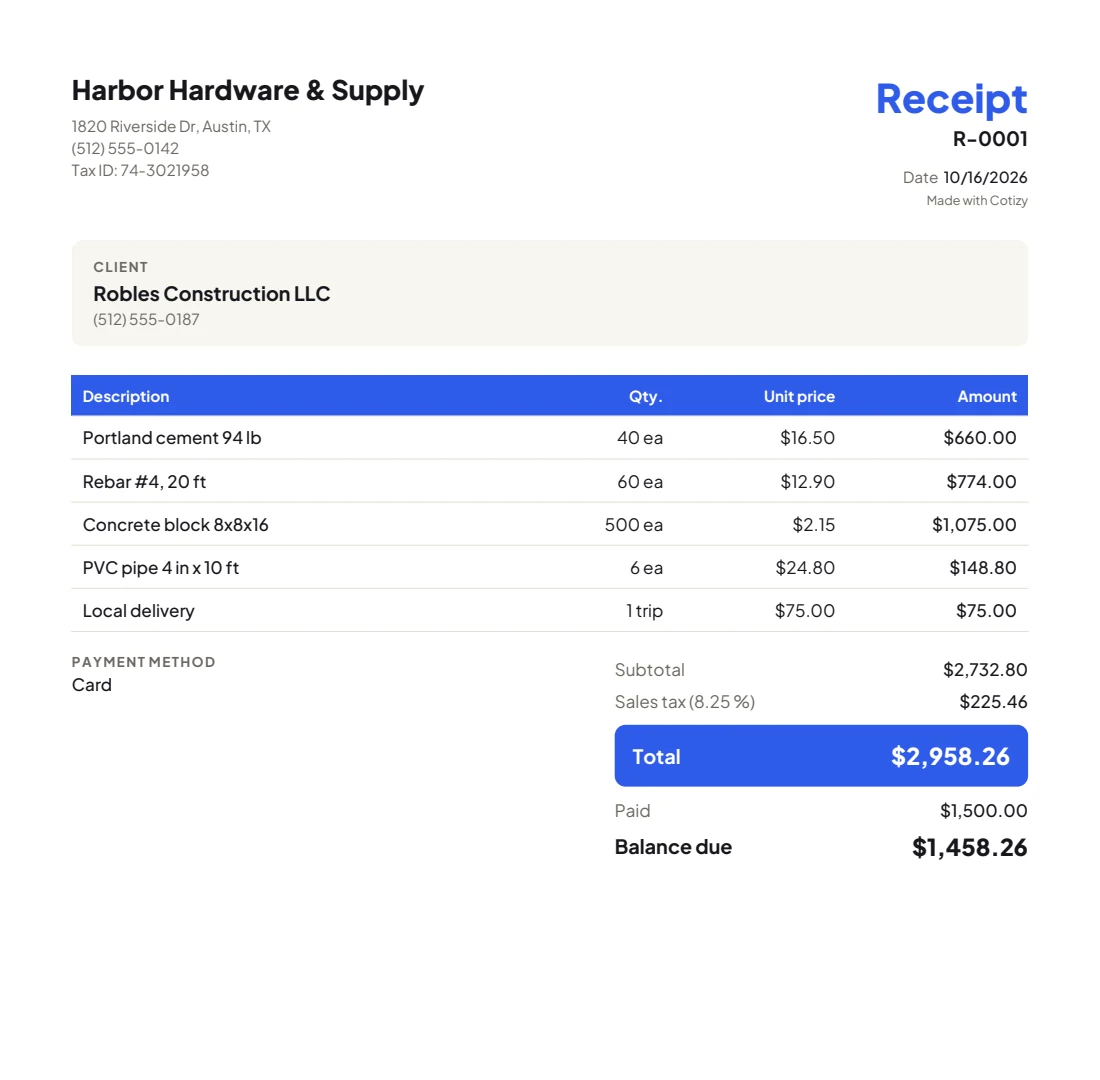
A receipt with a balance: the total, what they paid and what’s left, one under the other. NoteA receipt is proof of a payment between you and your client. It doesn’t replace an official tax invoice where one is required.
-
Make the receipt for what they paid today
Make the receipt as soon as you’re paid, with the sale total and what you received. If you sent a quote first, use the same prices: the client will check.
With CotizyIf you have the quote, open it and tap Make receipt: it comes out with the same products and prices. If not, tap New → New receipt. Under Payment, change Amount paid to what they gave you today and pick the payment method: the app works out the Balance due.
-
Send it to the client
Send it as a PDF by WhatsApp right away: the client has their proof of payment, and you have it saved in the chat.
With CotizyTap Send and choose WhatsApp. The receipt shows what was paid and the balance, and in your list it’s marked Balance due.
-
When they pay the rest
Update the receipt with everything they’ve paid and send it again. The client has a receipt with a zero balance, and you stop counting it as owed.
With CotizyOpen the receipt, tap the pencil to edit it and change Amount paid, or tap Paid in full. The receipt changes to Paid. What all your clients still owe you is on the main screen, under Still to collect.

Mistakes that leave money uncollected
Writing down only what they paid
If the receipt just says “paid $1,500,” later nobody remembers what was left. Always write the total and the balance.
Giving a receipt for the full amount when they paid part
That receipt says they paid everything. If they never pay the rest, you have no way to show they still owe you.
Putting several sales on one receipt
One receipt per sale. If you lump together purchases from different days, the balance stops adding up.
Keeping balances in your head
Write every balance down in one place and check it every week: that way you know who to collect from first.
Frequently asked questions
What is the balance due on a receipt?
It’s what’s left to pay: the total minus what the client has already paid. If the total is $2,958.26 and they paid $1,500, the balance due is $1,458.26.
What’s the difference between a deposit, a down payment and a partial payment?
In practice, very little: all three are part of the price, paid early and taken off the total. A deposit or down payment usually comes before the work or the delivery; a partial payment can come at any time.
Do I need a new receipt for every payment?
It’s not required. The clearest option for the client is one receipt for the sale, showing the total, what’s been paid and the balance, that you send again, updated, each time they pay. Every message stays in the chat with its date, so you both have the payment history.
How do I write the total in words?
Write the amount in words and the cents as a fraction of 100, for example: “One thousand two hundred fifty and 50/100 dollars”. Cotizy can write it for you: turn on Total in words in Settings, under Quotes and receipts.
Is a receipt the same as an invoice?
No. A receipt is proof of a payment between you and your client. Where an official tax invoice is required, it’s issued separately, in your country’s system.