 Luba
Luba Guides
How to track party rental inventory and bookings (free spreadsheet)
Quick answer
- To track a party rental business you need three lists: what you own, every booking with its dates and quantities, and how many pieces are free on each date.
- Before you say yes, add up what’s already booked for that day, including quotes not yet confirmed and anything that hasn’t come back, and subtract it from what you own.
- Count the pieces at delivery and at return, and write down what came back broken or missing: that’s how you charge for damage against the deposit, without an argument.
- Below there’s a free spreadsheet for Excel and Google Sheets that does that math. With an app like Luba, it warns you while you write down a booking if you don’t have enough chairs for those dates.
Want it now? Download the spreadsheet.
We make Luba, the app in the “With Luba” boxes. The spreadsheet and the method work just as well without the app.
What you need: How many of each item you own · Your bookings for the next few weeks · Excel, Google Sheets or LibreOffice
-
List what you own, once
One row for each thing you rent out: chairs, tables, linens, tents, dishes. For each one:
How many you own, actually counted. If you have 200 chairs but 6 are broken, you have 194.
The price per event, or per day if that’s how you charge.
The deposit per piece: how much you ask for each one, to cover damage.
What it costs if it breaks or goes missing: your replacement cost. Having it in writing means no haggling over the price at the return.
-
Write down every booking as soon as it comes in
One row per booking, with the delivery and return dates, the customer, their phone, the address and how many of each item. Write it down even if it isn’t confirmed yet: otherwise those chairs look free and you promise them to someone else.
Give it a status and change it when something happens: “To confirm,” “Confirmed,” “Delivered,” “Returned” or “Canceled.”
-
Download the free spreadsheet
The spreadsheet has three sheets: “Inventory,” “Bookings” and “Availability.” It comes with an example: delete it or type over it. No email, no sign-up.
Download the Excel spreadsheet. It works in Excel, LibreOffice and Google Sheets: to use it in Google, upload it to your Drive and open it with Google Sheets.
In “Bookings,” a row turns red when something was due back and hasn’t come back, and yellow while it’s still to confirm. “Total” adds up the pieces at their price plus the delivery fee, and “Balance due” subtracts what was paid and adds any damage.
-
Before you say yes, check how many are free
In “Availability,” enter the date of the order and, under “Requested,” how many the customer wants. The spreadsheet adds up what’s booked for that day, what’s still to confirm and what hasn’t come back, and tells you if you have enough.
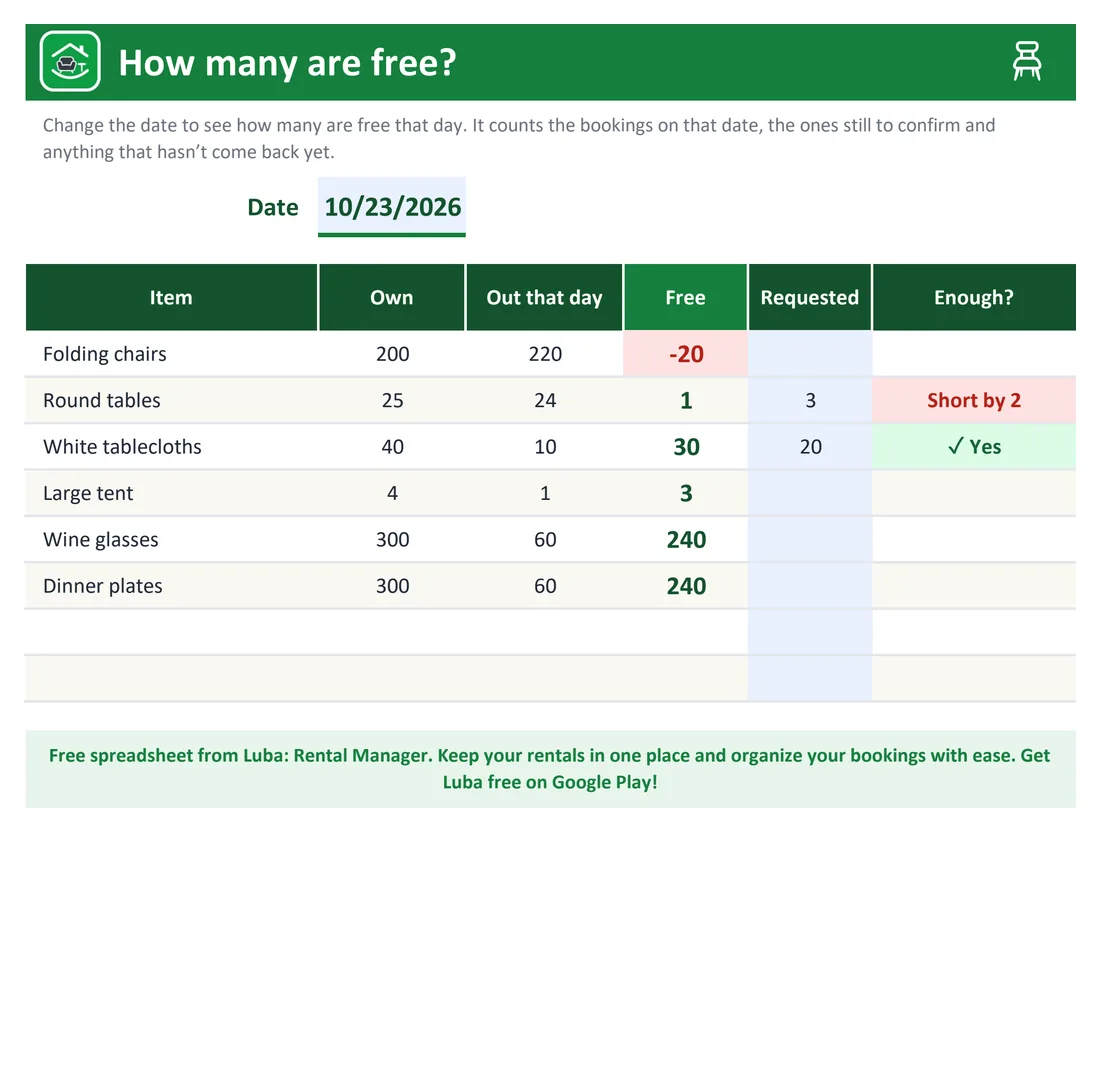
You’re 20 chairs short and have 1 table left on the 23rd: you see it before you promise. If you’re short, say so right away and offer what you do have: “I have 100 chairs available that day. Would 100 work?” It beats letting them down on the day of the event.
With LubaIn Luba, while you write down a booking, the app tells you how many are free on those dates, counting what’s still to confirm and what hasn’t come back. If you’re short, it warns you, for example with “20 short on these dates,” and offers to set the ones you do have.
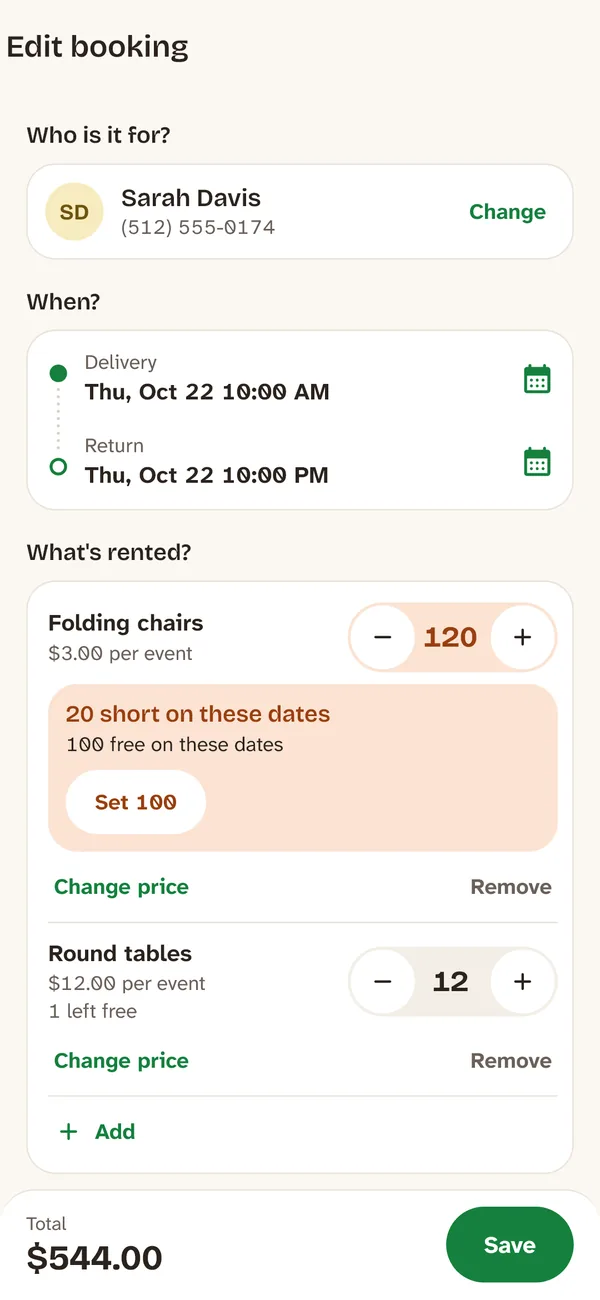
While you write the booking down, Luba tells you if you have enough. -
Count at delivery and at return
At delivery, count together with whoever receives the order, and ask them to confirm by text how many pieces they got. At return, count again and set aside what came back broken or missing.
Charge the damage at replacement cost and take it out of the deposit. Refund the rest of the deposit the same day, with a receipt.
NoteCollect the deposit before delivery and tell the customer, in writing, what each piece costs if it breaks or goes missing. That way no one is surprised at the return.
With LubaIn Luba, Receive return shows how many of each item went out. You mark how many are Returned broken or Lost, and the app suggests the damage amount at replacement price and how much of the deposit you give back. With Remove broken and lost items from inventory, your inventory stays up to date.
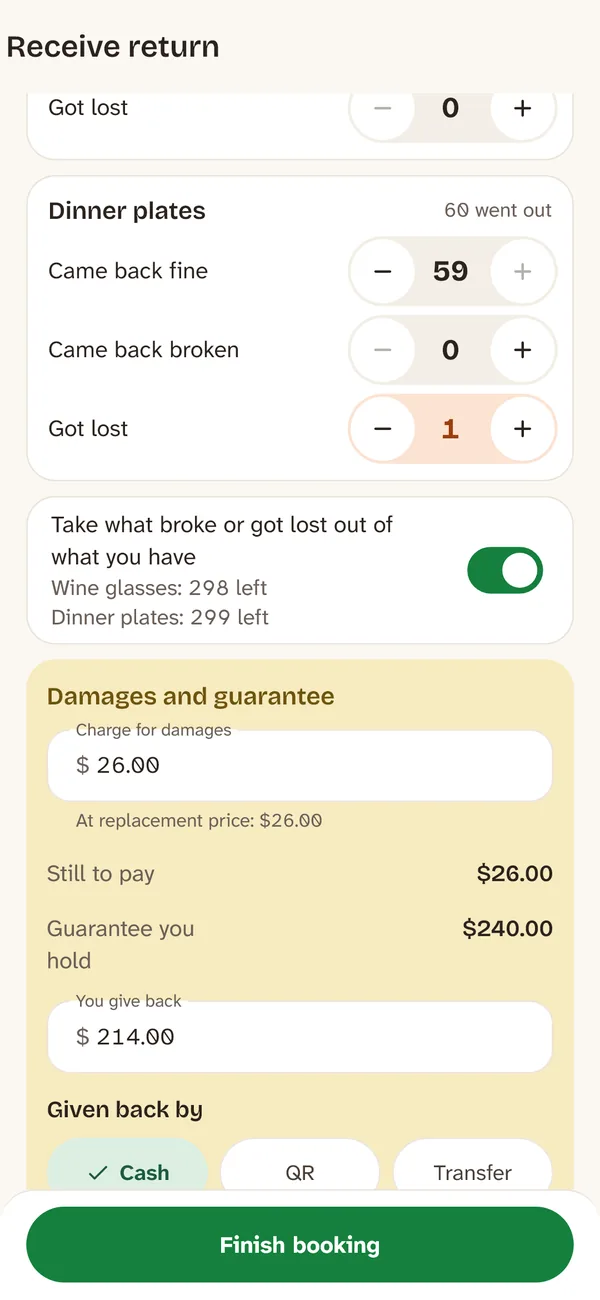
What came back broken or missing, and how much of the deposit you give back. -
Plan the day: what goes out and what comes back
Every evening, check what goes out and what comes back tomorrow: you load the truck once and call anyone who hasn’t returned on time.
With LubaLuba notifies you the night before how many deliveries and returns you have tomorrow. Today shows what goes out, what comes back and who hasn’t returned on time, and Route shows the order of your deliveries on a map.

Mistakes that cost money
Not writing down quotes
Those chairs look free and you promise them to another customer. Write them down from the first message.
Counting what you own from memory
Broken or missing pieces you never took off the list make you promise too much. Do a real count every so often.
Forgetting what hasn’t come back
If a customer is late returning, those pieces aren’t there for the next booking.
Not counting at delivery
If you don’t know how many went out, you can’t claim the ones that are missing.
Haggling over broken pieces at the return
Have the replacement cost of each piece in writing and tell the customer before delivery.
Delivering without a deposit or a payment up front
If something goes missing, you have nothing to cover it with.
Frequently asked questions
How do I keep track of party rental inventory?
With a list of what you own, a list of bookings with delivery and return dates and quantities, and a count of how many pieces are free on each date. Count at delivery and at return, and write down any damage.
How do I know how many chairs I have available on a date?
Subtract from what you own the chairs in every booking that overlaps that day, including the ones not yet confirmed, and the ones that haven’t come back from earlier bookings.
Is there a free party rental inventory template for Excel?
Yes. The one in this guide is free and needs no sign-up: inventory, bookings and a sheet that tells you how many pieces are free on a date and whether you have enough for an order.
Can I use the template in Google Sheets?
Yes. Upload the file to your Google Drive and open it with Google Sheets. The formulas and colors work the same.
What do I do if chairs come back broken?
Count them in front of the customer, write down how many, and charge each one at the replacement cost you told them about, taking it out of the deposit. Refund the rest of the deposit with a receipt.
Is there an app for a party rental business?
Yes. Luba, by RollanSoft, keeps your rentals in order from your phone. It warns you when you don’t have enough chairs for a date, shows what goes out and comes back each day, and helps with damage and the deposit at the return. It’s free for 10 kinds of items (100 chairs count as one), with no ads and no account.