 Luba
Luba Guides
How to organize your party rental deliveries and pickups for the day
Quick answer
- The night before, make one list with every delivery and pickup for the day: customer, phone, address with a map pin, delivery window, what to drop off or pick up, and the balance due.
- Order the stops by time first and then by area, so you don’t cross town twice. Load the truck in reverse: the last drop-off goes in first.
- Build the route in Google Maps with multiple stops (about 10 per route) and send the list to whoever drives. Text each customer half an hour before you arrive.
- With an app like Luba, Today shows what goes out and what comes back, Route lets you put the stops in order, and you send the route to your helper by WhatsApp.
Delivering tomorrow? Start with the list the night before.
We make Luba, the app in the “With Luba” boxes. The list, the order and Google Maps work just as well without the app.
What you need: Tomorrow’s bookings · Each customer’s exact location · Google Maps or Waze on your phone
-
Make the day’s list the night before
Put everything that happens tomorrow on one list: deliveries and pickups, including anything that was due back and hasn’t come back. For each stop:
Who: the name and phone number of the customer or whoever will be there.
Where: the address, a map pin and a note for finding it (“blue house, side gate”).
When: the delivery window you agreed on. If the party starts at 3 PM, setup can’t finish at 2:55.
What: how many of each item you drop off or pick up.
How much: the balance due and the security deposit, if it’s collected on delivery.
With LubaLuba notifies you the night before how many deliveries and returns you have tomorrow. Today shows what goes out and what comes back, with the time and the address, and at the top, who hasn’t returned on time.
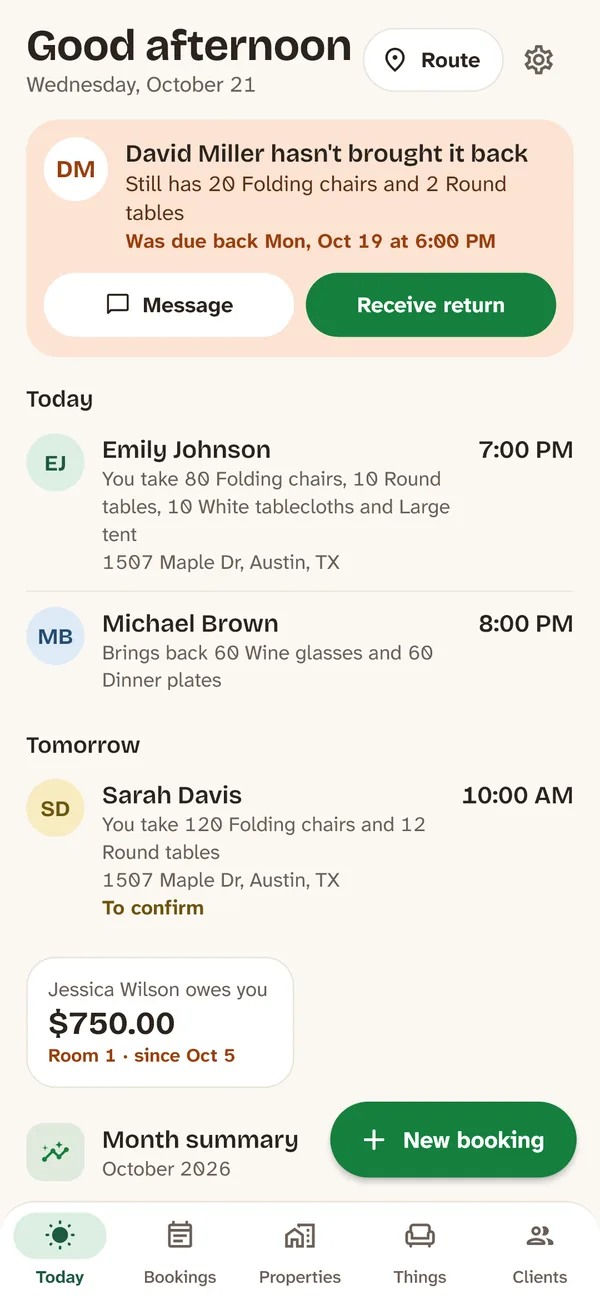
What goes out, what comes back and who hasn’t returned. -
Get the exact location
An address alone isn’t always enough: venues with several buildings, a backyard reached through a side gate, a park pavilion. When you confirm the booking, ask the customer to send their location pin and a note on where to unload.
A text you can copy:
“Hi Emily, for Saturday’s delivery, could you send me your location pin? And if you can, a note on where we should unload (side gate, driveway, back door). Thanks!”
With LubaIn Luba, in the customer or the booking, copy the location they sent you on WhatsApp (or a Google Maps link) and tap Paste location. Write the note under How to get there: it shows up in the booking and on the route.
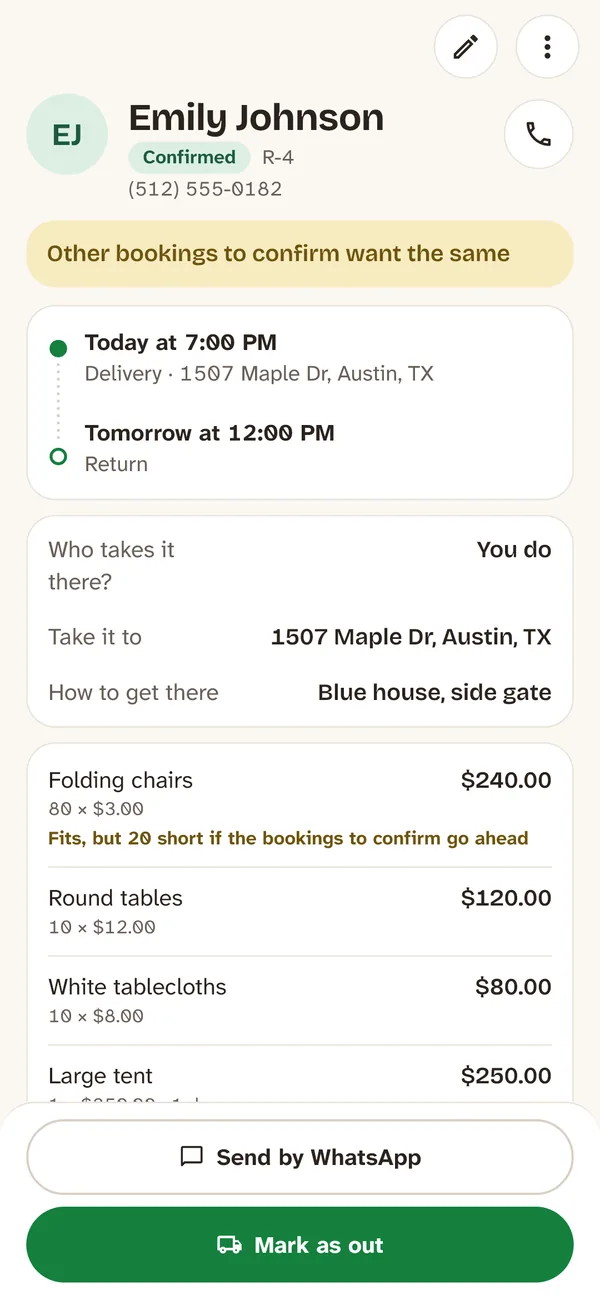
The address and how to get there, in the booking. -
Order the stops: time first, then area
Put the stops with a fixed time first, the ones that can’t wait. Group the rest by area so you don’t cross town twice. Pickups go in when you’re nearby or at the end of the day.
Count the time at each stop, not just the drive: unloading 100 chairs takes a while, and putting up a tent takes much longer. Leave room for rush-hour traffic.
Load the truck in reverse delivery order: the last drop-off goes in first. Keep each order together and label it, so no one ends up with pieces from another order.
With LubaIn Luba, tap Route on Today: you see today’s or tomorrow’s stops on a map and in a list. Hold a stop to move it and put them in the order you want.
-
Build the route in Google Maps with multiple stops
In Google Maps, search for the first stop and tap Directions. Then, in the three-dot menu, tap Add stop and add the rest. You can drag them to change the order.
Two things to know: Google Maps follows the order you enter (it doesn’t reorder the stops for you), and it takes about 10 locations per route, counting the start. If you have more stops, split the day into two routes, morning and afternoon.
NoteWaze isn’t built for routes with many stops: use it to get from one stop to the next.
With LubaIn Luba, every stop on the Route that has its location shows Go: it opens that spot in Google Maps or Waze, whichever you choose.
-
Send the list to whoever drives
If someone else delivers, send them the list in order, with everything they need so they don’t have to call you at every stop. For example:
“Route for Saturday. 1. Deliver at 10:00 AM · Sarah Davis · (512) 555-0174 · 1507 Maple Dr, blue house, side gate · (location) · Take: 120 folding chairs and 12 round tables · Balance due: $544. 2. Pick up · David Miller · (512) 555-0119 · Pick up: 20 folding chairs and 2 round tables.”
Ask them to count with the customer at drop-off and pickup, and to send you a photo if anything arrives or comes back broken. And to text each customer half an hour ahead: “Hi Sarah, we’re on our way with your chairs, about 30 minutes out.”
With LubaIn Luba, Send to my helper, on the Route, sends the stops in your order by WhatsApp: what to do and when, the customer and their phone, the address with the note and the location link, what to drop off or pick up, and the balance due.
-
At the end of the day, record what went out and what came back
Mark every delivery as done and every pickup as received, with anything that came back broken or missing. If someone hasn’t returned their items, call them that same evening: you’ll need those pieces for the next booking.
For deposits and damage, see the guide on party rental security deposits. To avoid promising pieces that haven’t come back yet, see how to avoid double booking.
With LubaIn Luba, in the booking, tap Mark as out when you deliver and Receive return when you pick up. Anything not back on time shows up at the top of Today, with Message to text the customer.

Mistakes that make you late
Planning the day that morning
You find out something’s missing when you should already be on the road. Make the list the night before.
Going with just the address
You lose time looking for the place. Ask for a location pin and a note.
Ordering by distance only
A party with a fixed start time can’t wait until you’re in the area. Time first, then area.
Not counting unloading time
Putting up a tent or unloading 200 chairs takes a while. Add it to each stop.
Loading in any order
You end up unloading half the truck at every stop. The last drop-off goes in first.
Forgetting pickups
What you don’t pick up today is missing tomorrow. Put pickups on the same list as deliveries.
Frequently asked questions
How do I organize party rental deliveries for the day?
The night before, make one list with every delivery and pickup, with the address, location pin, time window and what to take. Order them by fixed time first and then by area, load the truck in reverse delivery order and send the list to whoever drives.
How do I plan a route with multiple stops in Google Maps?
Search for the first stop, tap Directions and, in the three-dot menu, Add stop. Add the rest and drag them into order. Google Maps follows the order you enter and takes about 10 locations per route, counting the start.
What if I have more than 10 stops?
Split the day into two routes, for example morning and afternoon, and start the second one where the first one ends.
What order should I do deliveries and pickups in?
Fixed times first, like a party that starts early. Then group by area so you don’t cross town twice, and leave pickups for when you’re nearby or for the end of the day.
How much should I charge for party rental delivery?
It depends on your area and your costs. Many rental businesses charge by zone or by distance, with a minimum, and the fee covers both delivery and pickup. Some add a charge for stairs, long carries or setup. Show it on the quote, separate from the rental.
Is there an app to organize party rental deliveries?
Yes. Luba, by RollanSoft, keeps your rentals in order from your phone. It notifies you the night before about deliveries and returns, lets you put the day’s stops in order, opens each one in Google Maps or Waze and sends the route to your helper by WhatsApp. It’s free for 10 kinds of items, with no ads and no account.